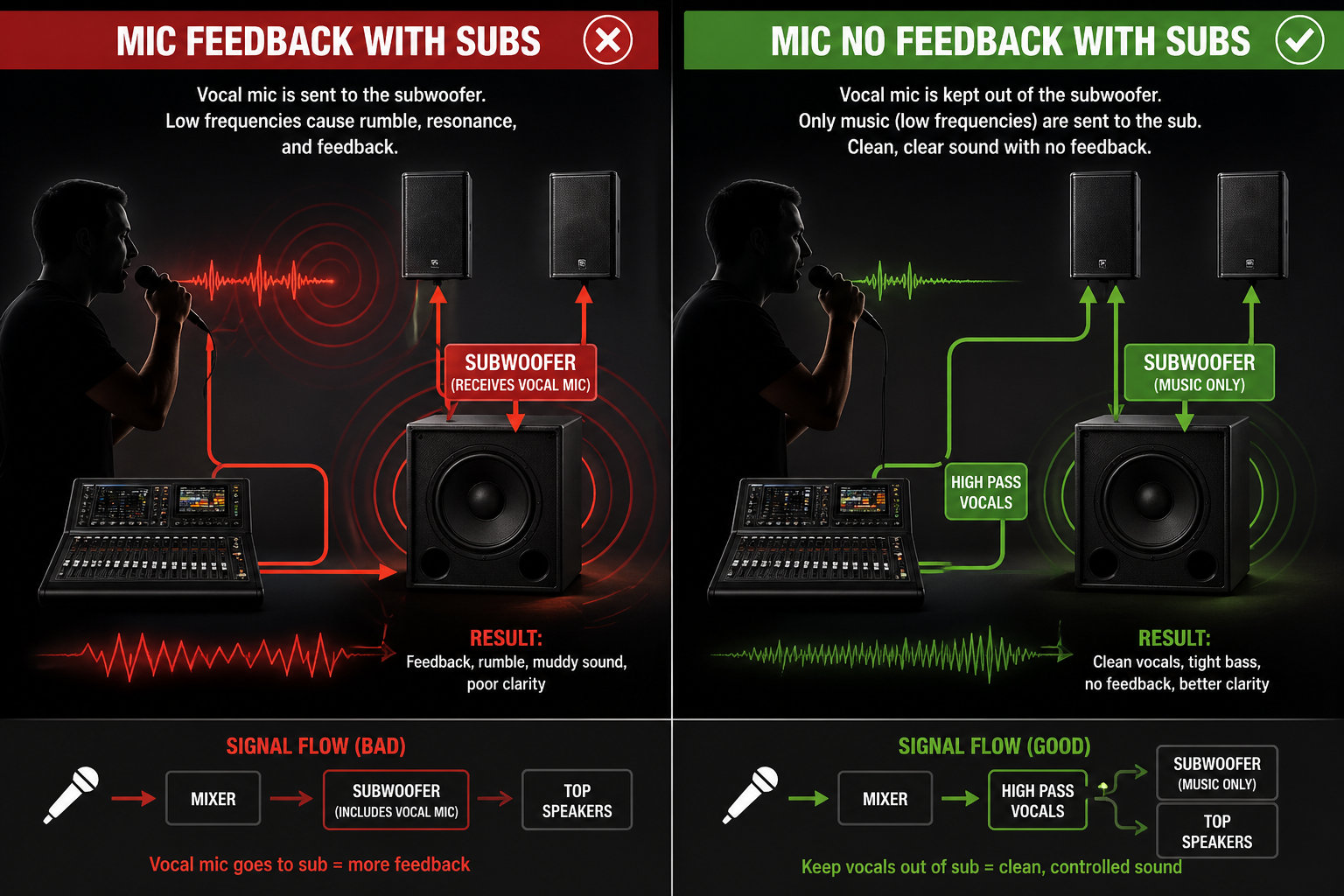
If you’ve ever had a microphone suddenly start rumbling, booming, or feeding back during a wedding, karaoke night, church event, or live DJ setup, there’s a good chance your subwoofer is part of the problem.
The good news?
This is actually a very common issue — and it’s also one of the easiest to fix once your sound system is set up correctly.
Why Subwoofers Cause Microphone Feedback
Subwoofers are designed to reproduce low frequencies. That’s great for music:
- Kick drums
- Bass guitars
- EDM drops
- Dance music energy
But microphones — especially speech and vocal microphones — don’t need deep bass frequencies.
When vocal mics get routed into the subwoofer, several things can happen:
- Low-end rumble builds up
- Handling noise gets amplified
- Stage vibration enters the mic
- Feedback becomes more likely
- Speech becomes muddy and hard to understand
This is especially noticeable during:
- Karaoke
- Wedding toasts
- Church speaking
- Announcements
- DJs using MC microphones
The subwoofer can essentially “re-amplify” unwanted low-frequency noise back into the microphones.
The Professional Solution: Separate Speaker Sends
One of the biggest advantages of using a digital mixer — or even a good analog mixer with bus sends — is the ability to control exactly what audio goes to each speaker.
Instead of sending everything everywhere, you can choose:
- Music goes to subs
- Vocals stay in tops only
- Monitor mixes stay clean
- DJs get better system control
This creates a cleaner, more professional sound system.
My Setup Using the Behringer X32 Rack
In my live event setup, I use an Behringer X32 Rack digital mixer to separate the audio routing between my tops and subwoofer.
Here’s how I run it:
Main Speakers (Tops)
The main left/right speakers receive:
- Music
- Vocal microphones
- Announcements
- Karaoke vocals
- Everything needed for full-range sound
Subwoofer
The subwoofer receives:
- Music only
- Low-frequency content
- Bass-heavy audio tracks
And most importantly:
✅ I do not send talking microphones or vocal mics to the subwoofer.
Why This Works So Well
Removing microphones from the subwoofer dramatically improves clarity and reduces feedback problems.
Benefits include:
- Cleaner vocals
- Less low-end rumble
- Better speech intelligibility
- Reduced feedback risk
- More professional sound quality
- Better gain before feedback
At weddings and karaoke events, this makes a huge difference.
Guests may not know why the sound feels cleaner — but they absolutely notice it.
Digital Mixers Make This Easy
Digital mixers like the:
- Behringer X32 Rack
- Behringer X32 Compact
- Midas M32
allow you to create dedicated outputs (buses/matrices) for:
- Subs
- Monitors
- Livestream audio
- Recording feeds
- Zone speakers
This gives DJs, churches, bands, and event companies much more control over their sound system.
What About Analog Mixers?
Even many analog mixers can do this if they include:
- Aux sends
- Subgroups
- Matrix outputs
- Dedicated crossover outputs
A properly configured analog mixer can still achieve excellent results.
The key idea is simple:
Don’t send vocal microphones to the subwoofer unless you truly need them there.
Final Thoughts
A powerful subwoofer can make music feel incredible — but routing microphones into it often creates more problems than benefits.
Using a mixer with proper bus routing lets you:
- Keep bass powerful
- Keep vocals clean
- Reduce feedback
- Improve overall sound quality
For my own setup, routing music to the subs while keeping microphones in the tops only has made karaoke nights, weddings, and live events sound dramatically cleaner and more professional.
Sometimes the biggest sound improvements don’t come from buying new speakers…
They come from routing the audio correctly.
Leave a Reply