If you’ve ever struggled to get loud enough with a live microphone — battling squeals, ringing, or that dreaded low “whoooo” sound — the problem usually isn’t your mic, your mixer, or your speakers.
It’s speaker placement.
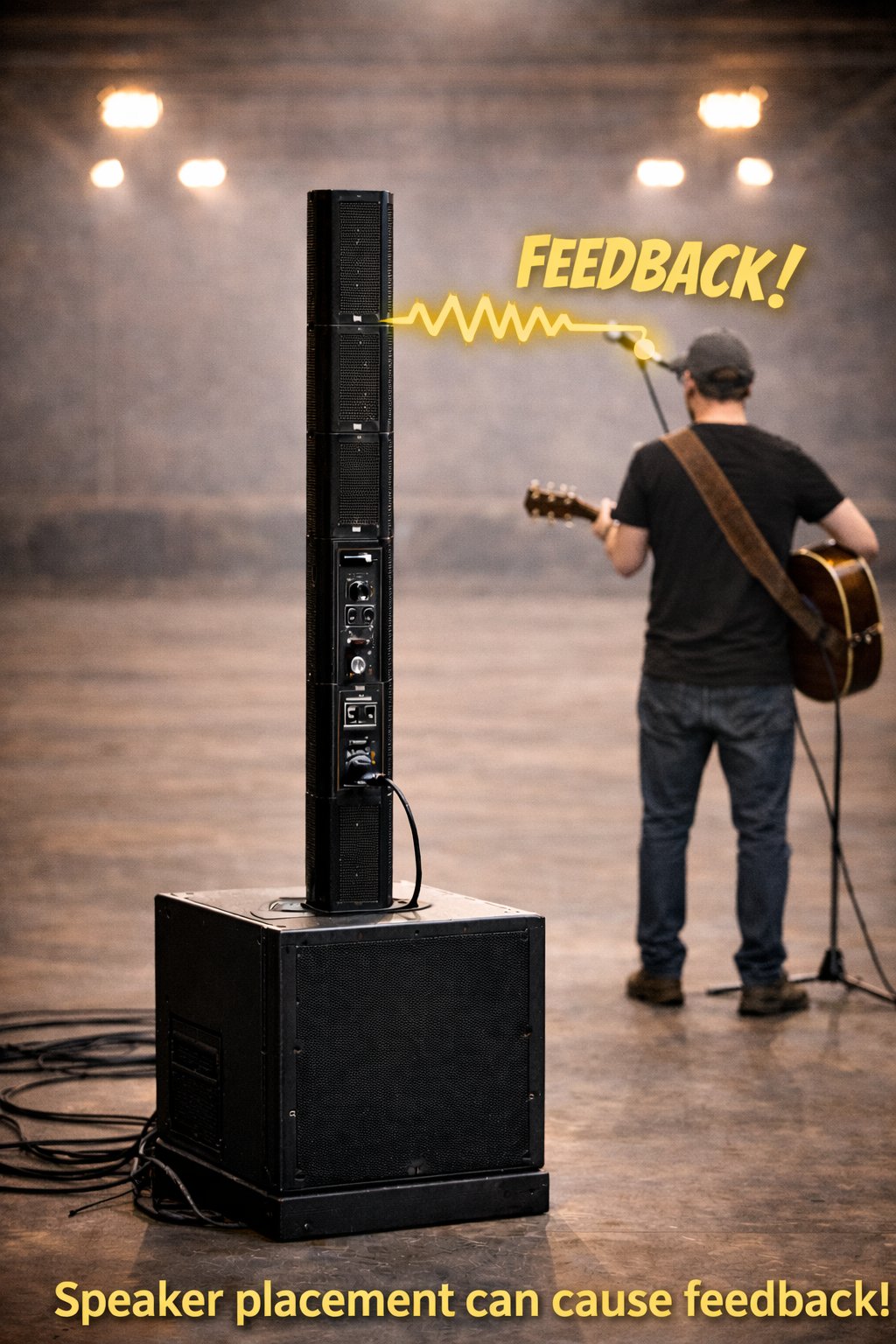
One of the most common mistakes we see at live events is placing speakers behind the performer while using a live microphone. This happens frequently with column array speakers, often because performers want to hear themselves.
Unfortunately, that setup almost guarantees feedback and limits how loud your system can safely go.
What Actually Causes Feedback?
Feedback happens when a loop is created:
- The microphone picks up sound
- That sound is amplified through the speaker
- The speaker’s output goes back into the microphone
- The loop repeats and amplifies itself
The closer and more directly a speaker is aimed at a microphone, the less usable volume you have before feedback starts.
Putting speakers behind you sends sound straight back into the mic — even if it doesn’t look obvious.
Why Column Array Speakers Are Often Misused
Column array speakers are popular because they:
- Look clean and professional
- Offer wide horizontal coverage
- Are often marketed as “feedback resistant”
But here’s the reality:
Column arrays still project sound forward. When they’re behind the performer:
- The mic hears the speaker almost immediately
- You lose usable gain very quickly
- Vocals can’t be turned up enough for the audience
- The system sounds quiet or strained even at higher volume
Column arrays can reduce feedback compared to traditional speakers — but they don’t eliminate physics.
The Golden Rule of Live Sound
The microphone should always be behind the speakers.
That means:
- Speakers placed in front of the performer
- Microphones pointed away from the speakers
- Clear separation between mic pickup and speaker output
When this is done correctly, you get:
- More usable volume
- Clearer vocals
- Less aggressive EQ
- A more confident performance
“But I Need to Hear Myself”
This is the most common reason performers put speakers behind them — and it’s a valid concern.
The problem is using your main speakers as monitors.
A much better solution is in-ear monitoring, especially for solo performers and small setups.
A Simple Fix: Use a Wired In-Ear Monitor
Most column array speakers include an audio output (XLR or ¼-inch). That output can feed a wired in-ear monitor system, letting you hear yourself clearly without turning speakers toward the mic.
A great, affordable option is the Behringer P2 Personal In-Ear Monitor Amplifier.
Why it works well:
- Accepts both XLR and ¼-inch inputs
- Runs on a simple AAA battery
- Compact belt-clip design
- No wireless setup or rack gear required
- Very affordable compared to full wireless IEM systems
Product link:
https://www.altomusic.com/products/behringer-p2-personal-ultra-compact-in-ear-monitor-amplifier-p2
With this setup:
- You hear yourself clearly at any volume
- Speakers stay in front of you, where they belong
- Feedback issues are dramatically reduced
- Your mix stays clean and controlled
What About Seeing the Audience?
If you’re worried about speakers blocking your view, you have options:
- Place speakers slightly off to the side
- Angle them forward toward the audience
- Use in-ears so you don’t rely on speaker spill
This keeps eye contact with the crowd without sacrificing sound quality.
What the Audience Experiences When Placement Is Wrong
When speakers are behind the mic:
- Vocals sound quiet or strained
- The performer keeps asking for “more mic”
- Feedback threatens the mix constantly
- The system never reaches its potential
To the audience, it feels like something is “off” — even if they can’t explain why.
Final Takeaway
If your microphone keeps feeding back, the solution is rarely:
- A different microphone
- A more expensive speaker
- Turning everything down
The solution is almost always:
- Correct speaker placement
- Proper monitoring
- Working with physics, not against it
Once your speakers are in front and your monitoring is handled correctly, everything else gets easier.
If you need help setting this up for your space or performance style, feel free to reach out — we’re always happy to help you get the most out of your sound system.
Leave a Reply