Category: Live Sound

  • Why Column Array Speakers Feed Back (and How Proper Placement Fixes It)

    Why Column Array Speakers Feed Back (and How Proper Placement Fixes It)

    If you’ve ever struggled to get loud enough with a live microphone — battling squeals, ringing, or that dreaded low “whoooo” sound — the problem usually isn’t your mic, your mixer, or your speakers.

    It’s speaker placement.

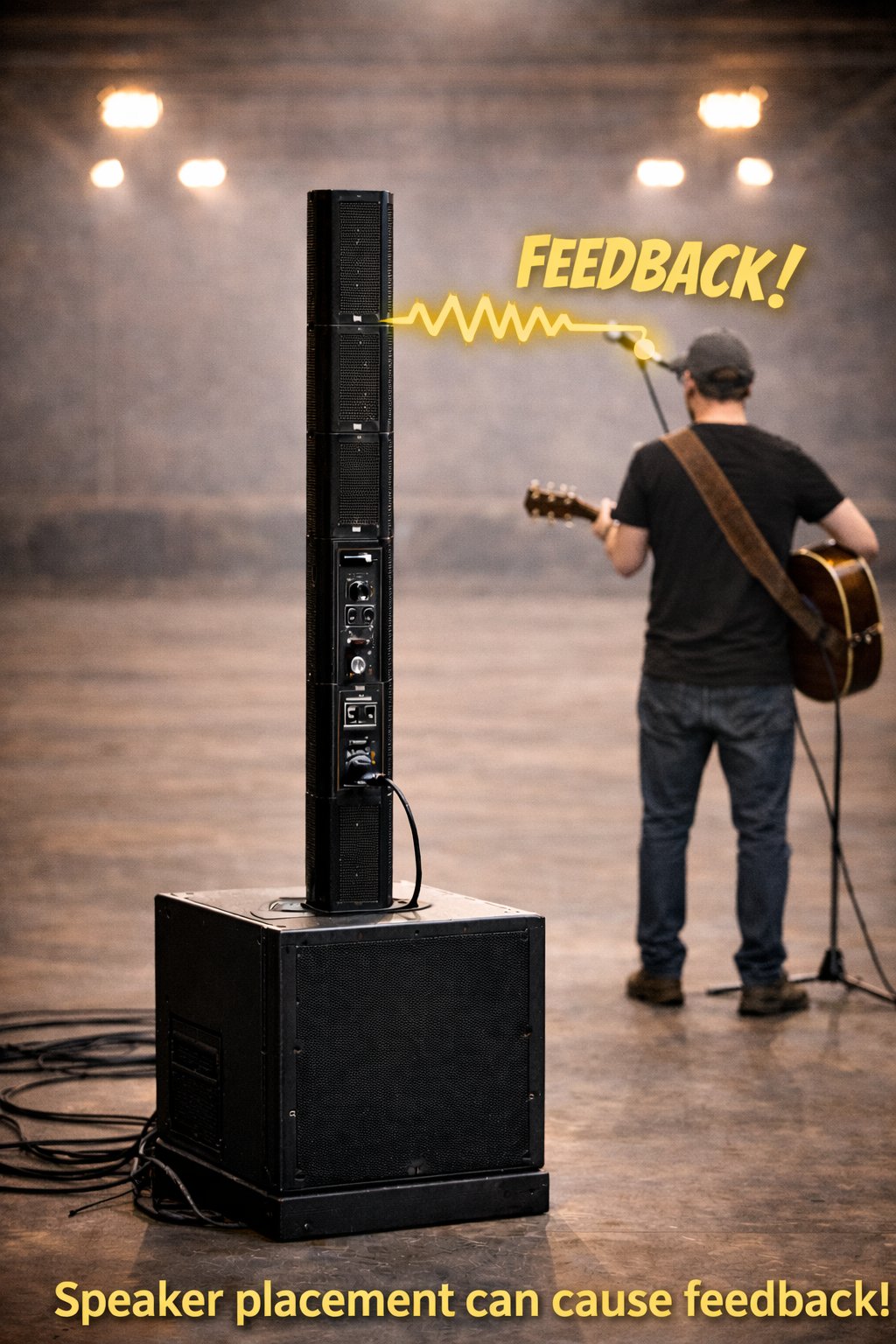
    One of the most common mistakes we see at live events is placing speakers behind the performer while using a live microphone. This happens frequently with column array speakers, often because performers want to hear themselves.

    Unfortunately, that setup almost guarantees feedback and limits how loud your system can safely go.


    What Actually Causes Feedback?

    Feedback happens when a loop is created:

    1. The microphone picks up sound
    2. That sound is amplified through the speaker
    3. The speaker’s output goes back into the microphone
    4. The loop repeats and amplifies itself

    The closer and more directly a speaker is aimed at a microphone, the less usable volume you have before feedback starts.

    Putting speakers behind you sends sound straight back into the mic — even if it doesn’t look obvious.


    Why Column Array Speakers Are Often Misused

    Column array speakers are popular because they:

    • Look clean and professional
    • Offer wide horizontal coverage
    • Are often marketed as “feedback resistant”

    But here’s the reality:

    Column arrays still project sound forward. When they’re behind the performer:

    • The mic hears the speaker almost immediately
    • You lose usable gain very quickly
    • Vocals can’t be turned up enough for the audience
    • The system sounds quiet or strained even at higher volume

    Column arrays can reduce feedback compared to traditional speakers — but they don’t eliminate physics.


    The Golden Rule of Live Sound

    The microphone should always be behind the speakers.

    That means:

    • Speakers placed in front of the performer
    • Microphones pointed away from the speakers
    • Clear separation between mic pickup and speaker output

    When this is done correctly, you get:

    • More usable volume
    • Clearer vocals
    • Less aggressive EQ
    • A more confident performance

    “But I Need to Hear Myself”

    This is the most common reason performers put speakers behind them — and it’s a valid concern.

    The problem is using your main speakers as monitors.

    A much better solution is in-ear monitoring, especially for solo performers and small setups.


    A Simple Fix: Use a Wired In-Ear Monitor

    Most column array speakers include an audio output (XLR or ¼-inch). That output can feed a wired in-ear monitor system, letting you hear yourself clearly without turning speakers toward the mic.

    A great, affordable option is the Behringer P2 Personal In-Ear Monitor Amplifier.

    Why it works well:

    • Accepts both XLR and ¼-inch inputs
    • Runs on a simple AAA battery
    • Compact belt-clip design
    • No wireless setup or rack gear required
    • Very affordable compared to full wireless IEM systems

    Product link:
    https://www.altomusic.com/products/behringer-p2-personal-ultra-compact-in-ear-monitor-amplifier-p2

    With this setup:

    • You hear yourself clearly at any volume
    • Speakers stay in front of you, where they belong
    • Feedback issues are dramatically reduced
    • Your mix stays clean and controlled

    What About Seeing the Audience?

    If you’re worried about speakers blocking your view, you have options:

    • Place speakers slightly off to the side
    • Angle them forward toward the audience
    • Use in-ears so you don’t rely on speaker spill

    This keeps eye contact with the crowd without sacrificing sound quality.


    What the Audience Experiences When Placement Is Wrong

    When speakers are behind the mic:

    • Vocals sound quiet or strained
    • The performer keeps asking for “more mic”
    • Feedback threatens the mix constantly
    • The system never reaches its potential

    To the audience, it feels like something is “off” — even if they can’t explain why.


    Final Takeaway

    If your microphone keeps feeding back, the solution is rarely:

    • A different microphone
    • A more expensive speaker
    • Turning everything down

    The solution is almost always:

    • Correct speaker placement
    • Proper monitoring
    • Working with physics, not against it

    Once your speakers are in front and your monitoring is handled correctly, everything else gets easier.

    If you need help setting this up for your space or performance style, feel free to reach out — we’re always happy to help you get the most out of your sound system.

  • Why Great Speakers Can Still Sound Bad (and How to Fix It in 10 Minutes)

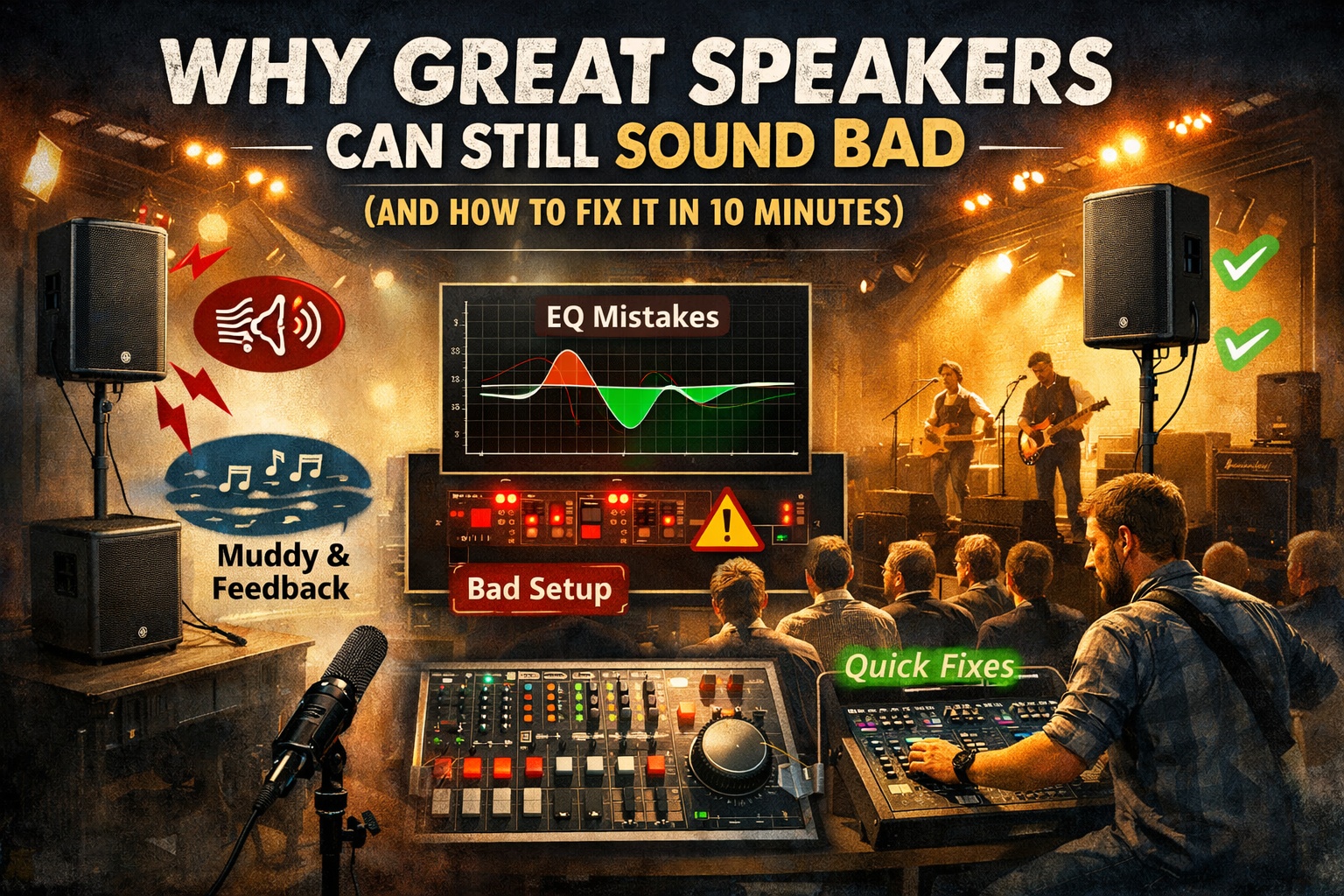
    Why Great Speakers Can Still Sound Bad (and How to Fix It in 10 Minutes)

    You finally invested in good speakers.
    You plug everything in.
    You hit play.

    …and somehow it still sounds muddy, harsh, quiet, or squealy.

    Here’s the truth most people don’t want to hear:

    Bad sound is usually not the speaker’s fault.

    In small venues, churches, garages, halls, and backyard gigs, even professional-grade speakers can sound awful if a few key things are off. The good news? Most of these problems can be fixed in about 10 minutes.


    1. The Room Matters More Than the Speaker

    Every room has its own personality — and most of them are not friendly to sound.

    Common problem spaces:

    • Hard walls (gyms, churches, halls)
    • Low ceilings
    • Wide open rooms with no absorption
    • Corners that trap bass

    These spaces reflect sound back at the speakers and microphones, creating muddiness, harsh highs, and feedback at random frequencies.

    Quick fix (2 minutes):

    • Don’t aim speakers directly at flat walls
    • Angle them slightly inward toward the audience
    • Pull speakers forward of microphones whenever possible

    You don’t need acoustic panels — just smarter placement.


    2. Speaker Placement Can Make or Break Everything

    This is the most common mistake I see.

    Common placement problems:

    • Speakers sitting on the floor
    • Speakers behind performers
    • Speakers aimed at knees or ceilings
    • Speakers shoved into corners

    Quick fix (3 minutes):

    • Raise speakers above head height
    • Aim them at ears, not chests or ceilings
    • Keep them slightly forward of microphones
    • Avoid corners whenever possible

    A $600 speaker placed correctly will beat a $2,000 speaker placed wrong every time.


    3. EQ Is for Cutting Problems — Not Making It “Louder”

    A lot of people EQ by turning things up. That’s backwards.

    If your sound is muddy, harsh, or feeding back, the issue is usually too much of one frequency — not too little of another.

    Quick fix (3 minutes):

    • Start with a flat EQ
    • Raise volume slowly until feedback just begins
    • Identify the problem frequency and cut it
    • Avoid boosting unless absolutely necessary

    Common problem areas:

    • 200–400 Hz → muddiness
    • 2–4 kHz → harshness and ear fatigue

    Small cuts go a long way.


    4. Auto-EQ Helps — But Only If You Let It

    Auto-EQ and RTA tools can be amazing… or terrible.

    They fail when the measurement mic is placed poorly, the room is empty, or the system is already clipping.

    Quick fix (2 minutes):

    • Place the measurement mic where listeners’ ears will be
    • Run Auto-EQ at moderate volume
    • Use it as a starting point, not the final answer
    • Make small manual tweaks afterward

    Auto-EQ won’t fix bad placement — but it will polish a good setup.


    5. Gain Structure: The Silent Sound Killer

    If your system is loud but unclear, quiet but distorted, or feeding back early, gain structure is often the problem.

    Quick check (1 minute):

    • Set input gains so peaks stay out of the red
    • Keep master faders near unity
    • Use speaker volume knobs for overall loudness

    Clean signal in equals clean sound out.


    The 10-Minute DIY Fix Checklist

    • Speakers above head height
    • Speakers in front of microphones
    • Aimed toward the audience, not walls
    • Flat EQ to start
    • Cut problem frequencies, don’t boost
    • Run Auto-EQ after placement is correct
    • Check gains before turning things up

    Final Thought

    Great speakers don’t automatically mean great sound.

    The room, placement, and tuning matter more than the logo on the box.

    If you take just a few minutes to set things up correctly, you can turn a frustrating gig into one that sounds clean, loud, and professional — even with budget gear.

    If anyone would like more information about one of these areas, please leave a comment below and we’d be happy to go into more detail.

  • Running Sound Yourself vs. Having a Sound Engineer

    Running Sound Yourself vs. Having a Sound Engineer

    What Works, What Breaks, and When to Make the Switch

    One of the biggest decisions performers face when they start gigging is who’s running the sound.

    At first, the answer is usually simple: you are.

    And honestly—there’s nothing wrong with that.


    When Running Sound Yourself Makes Sense

    If you’re just getting started playing out in public—friends’ events, small weddings, coffee shops, breweries, church socials—running your own sound is often the most realistic option.

    This works especially well if you’re:

    • A solo singer-guitarist
    • Keyboard and vocal
    • Acoustic duo
    • Small, low-volume setup

    In these cases, the setup is usually simple:

    • A small mixer
    • One or two speakers
    • A couple of mics
    • Maybe a DI for guitar or keys

    You can dial in a basic mix, set levels conservatively, and focus on the performance. Most audiences won’t notice small imperfections—and that’s okay.

    Running your own sound at this stage actually teaches you a lot:

    • How loud is too loud
    • What feedback sounds like before it happens
    • How EQ affects vocals
    • Why mic placement matters

    Those lessons are valuable.


    Where It Starts to Get Difficult

    The challenge shows up when your setup grows.

    Once you start adding:

    • Bass guitar
    • Electric guitars
    • Drums
    • Multiple vocalists
    • Full bands with keys, backing tracks, or percussion

    …running sound yourself becomes significantly harder.

    At that point, you’re trying to do two jobs at once:

    1. Perform
    2. Mix the show

    The biggest issue isn’t technical—it’s perspective.


    You Can’t Hear the Room From the Stage

    When you’re on stage:

    • You don’t hear what the audience hears
    • You’re standing behind the speakers
    • The mix changes dramatically from venue to venue

    Important questions you can’t easily answer while performing:

    • Are the vocals clear out front?
    • Is the guitar overpowering the singer?
    • Is the bass muddy?
    • Do backing vocals disappear in the mix?
    • Does the room sound harsh or thin?

    Even if it sounded great during rehearsal, every venue is different:

    • Room size and shape
    • Ceiling height
    • Wall materials
    • Indoor vs outdoor
    • How full the room is

    What worked last weekend may sound completely different tonight.


    “But We Did a Sound Check…”

    Sound check helps—but only if it’s done correctly.

    When you’re running sound yourself, sound check often means:

    • Setting levels on stage
    • Playing one song
    • Asking, “Does that sound okay?”

    The problem is—you’re still not hearing the audience mix.


    Sound Check Is More Than Levels — It’s Tuning the System

    One of the most overlooked parts of sound check is tuning the speakers to the room.

    Many people assume:

    • Good speakers = good sound
    • Expensive gear automatically sounds better

    That’s not always true.

    Professional-grade speakers can sound bad in the wrong room, while basic speakers can sound great when placed correctly and tuned well.

    Every venue has its own acoustic challenges:

    • Hard walls that reflect highs
    • Low ceilings that exaggerate mids
    • Corners that boost bass
    • Long rooms that cause uneven coverage

    If you don’t account for the room, no amount of good gear will fix it.


    Speaker Placement Matters More Than You Think

    Before touching EQ, placement comes first:

    • Speakers too low blast the front row
    • Speakers too high lose clarity
    • Speakers behind mics increase feedback
    • Corners and walls can cause muddy low end

    Simply raising speakers, angling them properly, or moving them a few feet can dramatically improve sound before any EQ is applied.


    Tuning Speakers With EQ and RTAs

    Once placement is solid, sound check should include tuning the system, not just setting channel levels.

    This is where EQ and Real-Time Analyzers (RTAs) help.

    An RTA shows you:

    • Frequency build-ups in the room
    • Problem frequencies that cause feedback
    • Harsh or muddy areas that hurt clarity

    Using this information, you can:

    • Reduce boomy low frequencies
    • Tame harsh highs
    • Pull back problem mids
    • Improve vocal clarity
    • Keep volume under control

    This isn’t about making it sound “cool”—it’s about making it clear, stable, and consistent.


    Feedback Control Starts at Sound Check

    Tuning the system early helps prevent feedback before the show begins.

    Instead of chasing feedback mid-song:

    • Identify problem frequencies early
    • Gently notch them out
    • Keep overall levels lower
    • Let vocals sit clearly without pushing volume

    This is especially important when you’re running sound yourself, because once the show starts, your attention is split.


    Why This Is Hard to Do While Performing

    Proper tuning requires:

    • Time
    • Listening from the audience area
    • Adjusting EQ while sound is playing

    That’s difficult when you’re also:

    • Singing
    • Playing
    • Watching cues
    • Engaging the crowd

    This is one of the biggest reasons bands eventually bring in a sound engineer.


    When It’s Time to Have Someone Else Run Sound

    If you’re playing:

    • Full-band shows
    • Important events (weddings, ticketed shows, festivals)
    • New venues often
    • Shows where consistency matters

    …it may be time to have someone else run sound.

    A dedicated sound person:

    • Mixes from the audience perspective
    • Adjusts for the room in real time
    • Prevents issues before they’re obvious
    • Lets performers focus on performing

    The result is a more professional, consistent experience—every time.


    Simple DIY Speaker Tuning Checklist

    If you’re running sound yourself, use this quick checklist during sound check:

    Before Powering On

    • Place speakers in front of microphones
    • Raise speakers so horns are above head level
    • Angle speakers toward the audience, not walls

    Basic Setup

    • Start EQ flat on speakers and mains
    • Set input gains properly (no clipping)
    • Use high-pass filters on vocals and instruments that don’t need low end

    Room Tuning

    • Play music or pink noise through the system
    • Listen from the audience area
    • Use an RTA if available to spot problem frequencies
    • Gently cut problem areas (don’t boost aggressively)

    Feedback Control

    • Slowly raise vocal levels during sound check
    • Identify ringing frequencies
    • Notch them slightly with EQ
    • Stop before feedback becomes obvious

    Final Check

    • Walk the room if possible
    • Check vocal clarity over instruments
    • Record a short clip on your phone from the audience area
    • Make small adjustments only

    Once the Show Starts

    • Avoid major EQ changes mid-set
    • Adjust volume slowly
    • Focus on performing

    The Bottom Line

    Running sound yourself is a great way to start—and for small acts, it may always be enough.

    But as your setup and expectations grow, sound quality becomes harder to manage from the stage.

    At some point, the choice isn’t about gear or cost—it’s about consistency, clarity, and professionalism.

    If you’ve ever wondered:

    • “Does this sound balanced?”
    • “Why did it sound great last week but not tonight?”
    • “I wish I knew how it sounded out front…”

    That’s your sign.

    Your audience may not know why it sounds better—but they’ll hear the difference.

  • What a Sound Check Really Is (and Why It Matters More Than You Think)

    What a Sound Check Really Is (and Why It Matters More Than You Think)

    A sound check isn’t just “testing the mic.” It’s the part of setup where everything comes together — planning, equipment, room layout, and final fine-tuning — to make sure the event sounds great from the very first word.

    Most people only see the last few minutes of a sound check, but there’s a full process behind it.


    Pre-Step: Good Sound Starts With Planning

    Before anything is turned on, your audio team needs a clear picture of the event. This includes knowing:

    • the approximate size of the room
    • what microphones will be used
    • which instruments or performers need microphones
    • how many channels each input will take
    • where speakers will be placed
    • whether monitors (if any) are required
    • what outputs feed FOH, recording, or online broadcast feeds

    A key part of this planning is deciding what actually needs to be mic’d:

    • piano
    • guitar
    • drums
    • vocalists
    • choirs
    • strings (cello, violin, etc.)
    • brass
    • soloists or ensembles

    And one important question shapes the entire setup:

    👉 Are you only reinforcing sound for the room, or are you also recording or sending audio to an online broadcast feed?

    This matters because some instruments — like trumpets, trombones, or other naturally loud instruments — may not need microphones for in-room reinforcement, but do need to be mic’d if:

    • you’re recording the performance
    • you’re sending audio to an online broadcast feed

    Room-only reinforcement and broadcast audio have very different needs, so the microphone plan should match the goal.

    Most digital mixers make this planning process much easier. You can build a scene ahead of time, label channels, route audio for recording or broadcast, and set rough EQ, compression, gates, FX, and outputs based on rules of thumb and past experience. The sound check is where those planned settings get fine-tuned.


    1. Line Check: “Does everything work and make noise (or not make noise) as expected?”

    This is the first hands-on step.
    We go through every input one at a time:

    • Does the mic turn on?
    • Does the cable crackle or buzz?
    • Is there hum or feedback?
    • Do instruments and playback devices send the correct level?

    A solid line check catches most problems before they become show-stoppers.


    2. Gain Staging: “Set every signal so it’s clean, strong, and distortion-free.”

    Proper gain staging is the foundation of a good mix. Even the best EQ or effects can’t fix bad gain.

    And while you can run low gain, it’s extremely helpful to visually see healthy signal levels on the mixer. When meters are active and easy to read, it becomes much simpler to:

    • spot clipping
    • catch low input problems
    • maintain consistency across microphones
    • make fast adjustments during the check

    Good gain gives you a clear picture of the mix — not just what your ears pick up.


    3. System Fine-Tuning: EQ, Compression, Noise Gates & FX

    The big-picture setup is already planned — room size, microphone needs, speaker placement, and routing. But every space behaves differently once things are powered on.

    The sound check is where we polish everything by adjusting:

    • EQ for clarity
    • Compression for smooth dynamics
    • Noise gates to clean up unwanted stage noise
    • Reverb/FX to enhance the mix without overpowering it

    Digital mixers make this especially efficient since everything is pre-labeled and partially dialed in. The sound check is the refining stage.


    4. Monitor Mixes (If Needed)

    Not every event needs monitor speakers.

    • Choirs often hear their accompanist naturally.
    • Bands, however, rely heavily on monitors to perform confidently.

    But there’s a trade-off:

    Wedge monitors:

    • traditional and familiar
    • but add stage noise
    • can cause mic bleed
    • increase the risk of feedback

    In-ear monitors (IEMs):

    • give musicians clean, isolated sound
    • reduce stage volume
    • eliminate feedback from monitors

    Whenever possible, wireless IEMs are the cleaner and more controlled option.


    5. Balancing the Room

    With analog mixers, this typically means running back and forth between the board and various points in the venue unless a second engineer is helping.

    With digital mixers, wireless tablet control changes everything. Using an iPad, you can walk the room and adjust the mix so it matches what the audience is actually hearing — one of the biggest advantages of modern sound systems.


    6. Final Run-Through: The Reality Check

    This is where performers run through a song, a few lines, or a short rehearsal piece.

    It’s also the ideal time to use a dB meter.
    Your ears adjust to volume quickly, but a meter stays consistent.

    This helps make sure:

    • people in the back hear clearly
    • people in the front aren’t overwhelmed
    • the overall volume level stays comfortable and intentional

    If you want to understand how distance affects volume and why front-row vs. back-row volume varies, here’s a helpful reference:
    👉 https://humeckyaudioandvideo.com/why-speaker-height-matters-more-than-you-think/


    In the end…

    A sound check is about removing surprises and giving performers and the audience the best possible experience.
    It’s planning + testing + refining + verifying — all before the event even begins.

  • How Much Time Is Needed to Set Up for an Event?

    How Much Time Is Needed to Set Up for an Event?

    Event setup isn’t just rolling in speakers and plugging things in. Every environment—whether it’s a mobile DJ gig, a wedding in a windy field, or a full stage production—comes with its own challenges. Below is a breakdown of how much time is usually needed and which factors affect it most.


    Mobile DJ Setup: Quick and Efficient

    Mobile DJ setups are usually the fastest. The equipment is streamlined, and the workflow is predictable.

    Typical Setup Time: 30–60 minutes

    • Load in speakers, subs, lighting, and DJ controller
    • Run basic power
    • Quick microphone feedback check
    • Aim and balance speakers toward the dance floor

    DJ systems often use heavy bass speakers and subwoofers, which are excellent for music but not ideal for microphones. High bass output can introduce rumble, muddiness, and low-frequency feedback, especially if microphones are used near the speakers. This is why mobile DJ setups focus on clean music first, with simple mic use as needed.


    Weddings: Power Challenges & Environmental Noise

    Weddings are more unpredictable and often require longer setup times. Outdoor venues, barns, fields, and rustic spaces frequently have limited or unreliable power, unusual acoustics, or high environmental noise.

    Typical Setup Time: 60–120 minutes

    Power situations:

    • Good power: Standard outlets close by
    • Moderate power: Long extension cord runs, multiple circuits
    • Poor or no power: Battery-powered speakers or generators

    When running a generator, we always try to keep the generator as far away as possible from the ceremony or reception area. Generator noise can be very difficult to overcome with microphones, especially during vows or speeches. Placing the generator farther away helps reduce this noise bleeding into the sound system and keeps the audio cleaner.

    Battery-powered speakers are a great solution for remote ceremonies, but they do have limits: they are not always loud enough for large crowds, especially when there is wind, distance, or environmental noise.

    Environmental noise factors include:

    • Road noise
    • Running water (rivers, fountains)
    • Wind
    • Animals or nearby farms
    • Echo from open areas

    Rule of Thumb for Outdoor Ceremonies (75+ guests):

    • Two battery-powered speakers (or one high-power speaker if seating is tight)
    • One lapel mic for the officiant
    • One or two handheld mics
    • A small mixer for clear audio levels

    Weddings take extra setup time simply because nature, power, and layout rarely behave perfectly.


    Stage Events: Full Production Setup

    Stage events require professional sound, more equipment, and additional preparation. These setups have the longest timelines because they involve multiple performers, microphones, monitors, subwoofers, and speaker systems.

    At Humecky Audio and Video, we use professional live sound speakers and equipment to deliver clean, powerful, and reliable audio for stage events. Our systems are designed to provide clarity for both performers and the audience, ensuring everything sounds professional from start to finish.

    Typical Setup Time: 2–4 hours or more

    Factors That Increase Setup Time

    • Number of microphones for performers, choirs, bands, etc.
    • Setting up stage monitors or in-ear monitor systems
    • Number and placement of speakers
    • Running long cable lengths and organizing snakes
    • System tuning to avoid feedback
    • Setting up backline gear (instruments, DI boxes, amp mics)
    • Coordinating with lighting, video, and stage management

    Subwoofer Setup Matters — Cardioid Subs Recommended

    For stage sound, cardioid subwoofer configurations are highly recommended. They significantly reduce the amount of low-frequency energy spilling onto the stage, improving performer clarity and reducing microphone rumble.

    • Cleaner sound on stage
    • Less rumble in vocal microphones
    • Reduced low-frequency feedback
    • More controlled bass aimed at the audience

    Sound Check: The Most Important Step

    If you want a live event to sound truly professional, a sound check is essential.

    • Gives the sound engineer time to build a proper mix
    • Helps performers understand their monitor levels
    • Allows adjustments for EQ, gain, and effects
    • Identifies issues long before the audience arrives

    A proper sound check is one of the biggest factors in producing clean, reliable live sound.


    Power Setup Scenarios: What to Expect

    Power availability directly affects how long setup will take.

    Ideal Power (Fastest Setup)

    • Clean outlets nearby
    • Minimal extension cords
    • Stable voltage

    Extension Cord Power (Moderate Setup)

    • 50–100 ft extension cord runs
    • More time routing and securing cables
    • Must balance load across circuits

    Generator or Battery Power (Slowest Setup)

    • Need to test generator output and grounding
    • Must place generator far away to reduce noise
    • Must check battery levels and runtime for mission-critical gear

    Rule of Thumb: The farther the power source—and the noisier the environment—the longer the setup.


    Final Thoughts

    Setup time depends on the event type, speaker needs, and venue conditions. Mobile DJ setups are quick, weddings require more preparation due to power and noise challenges, and stage events take the most time due to complexity and professional sound requirements. Proper subwoofer setup and a thorough sound check dramatically improve results.

    To help reduce the setup time, we often bring additional crew members. More crew can speed up the physical setup, but the total preparation time remains the same because testing, tuning, routing cables, and sound checks still must be completed with care.

    Useful Tip: Communicate Ahead of Time

    To reduce setup time even further, it’s highly recommended to communicate with your audio team before the event.

    Let us know:

    • How the event space will be laid out
    • Where power will be coming from
    • What type of sound is expected
    • How many guests or performers will be present

    The more we can prepare ahead of time, the less time we have to spend figuring things out on the fly. Clear communication helps us bring the right equipment, plan cable runs, understand audience placement, and ensure a smooth and efficient setup.

    If you need help estimating your event’s setup time, reach out—we’re here to help your event sound its absolute best.

  • Why Speaker Height Matters More Than You Think

    Why Speaker Height Matters More Than You Think

    When setting up sound for an event, one of the easiest details to overlook is how high your speakers are placed. Speaker height directly determines how far sound travels, how evenly the audience hears it, and how clean the mix stays. Even the most expensive speakers won’t perform their best if they’re firing into the ground or directly into the front row of people.

    Higher Speakers = Better Distance and Coverage

    Mid and high frequencies—speech, vocals, instruments—are directional. Where the speaker points is where the sound goes.

    If your speakers are too low, the front row absorbs most of the energy and the back of the space hears very little. Raising speakers above head level allows sound to project over the audience and reach farther distances with cleaner clarity. This maintains consistent volume from the first row all the way to the back without needing to push the system too hard.

    Why Floor-Level Speakers Don’t Work (Except Subwoofers)

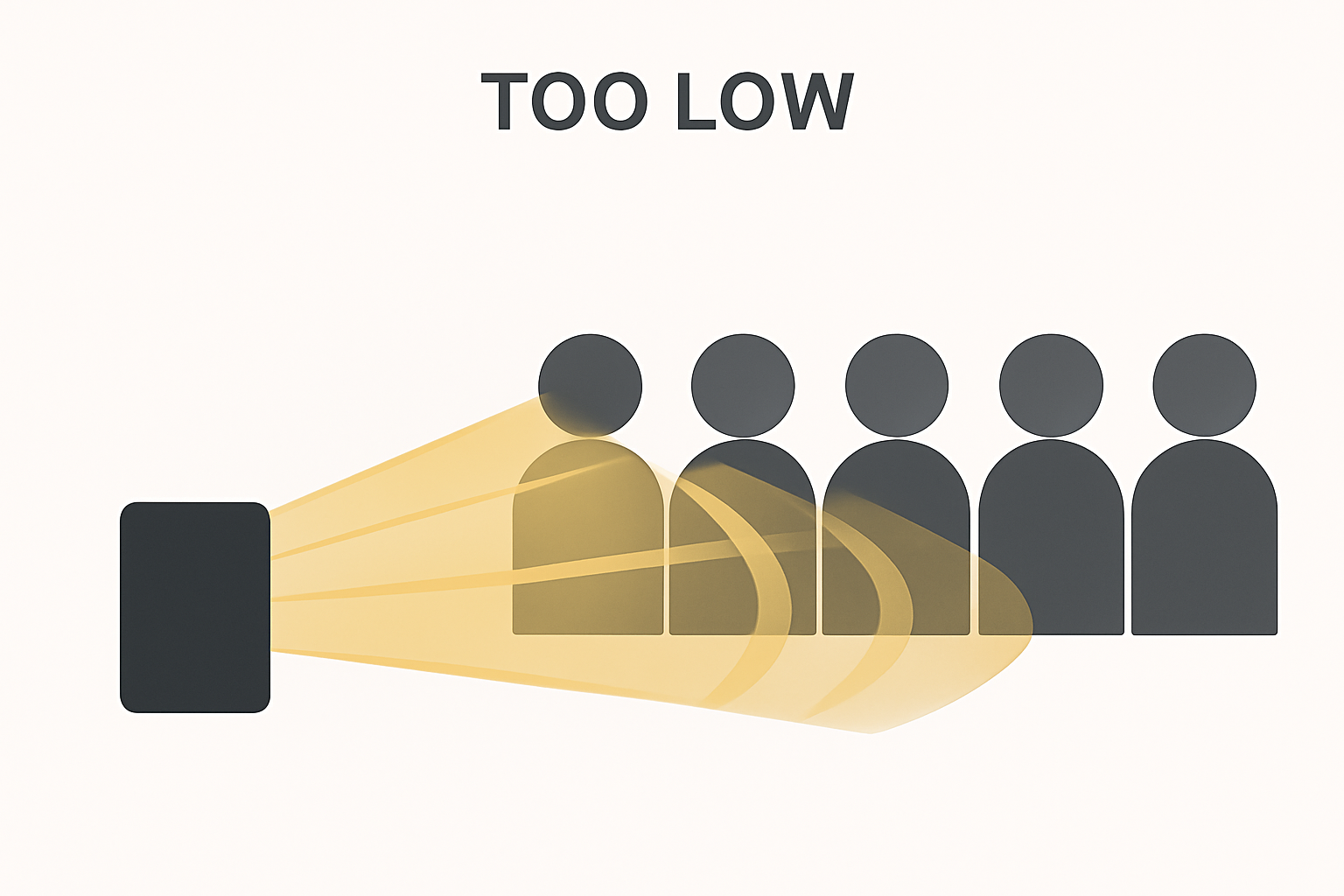
    Speaker placed too low so sound hits the front row and floor instead of the whole audience

    Placing a full-range speaker on the ground is the fastest way to ruin your sound coverage. When full-range speakers sit directly on the floor:

    • Most of the energy fires into the ground or people’s knees
    • Higher frequencies get blocked almost immediately
    • You have to turn the volume up much higher
    • The mix becomes uneven and muddy
    • Feedback becomes more likely

    The first few rows get blasted, yet people 50–100 feet away may still struggle to hear anything clearly.

    Raised Speakers Give the Best Results

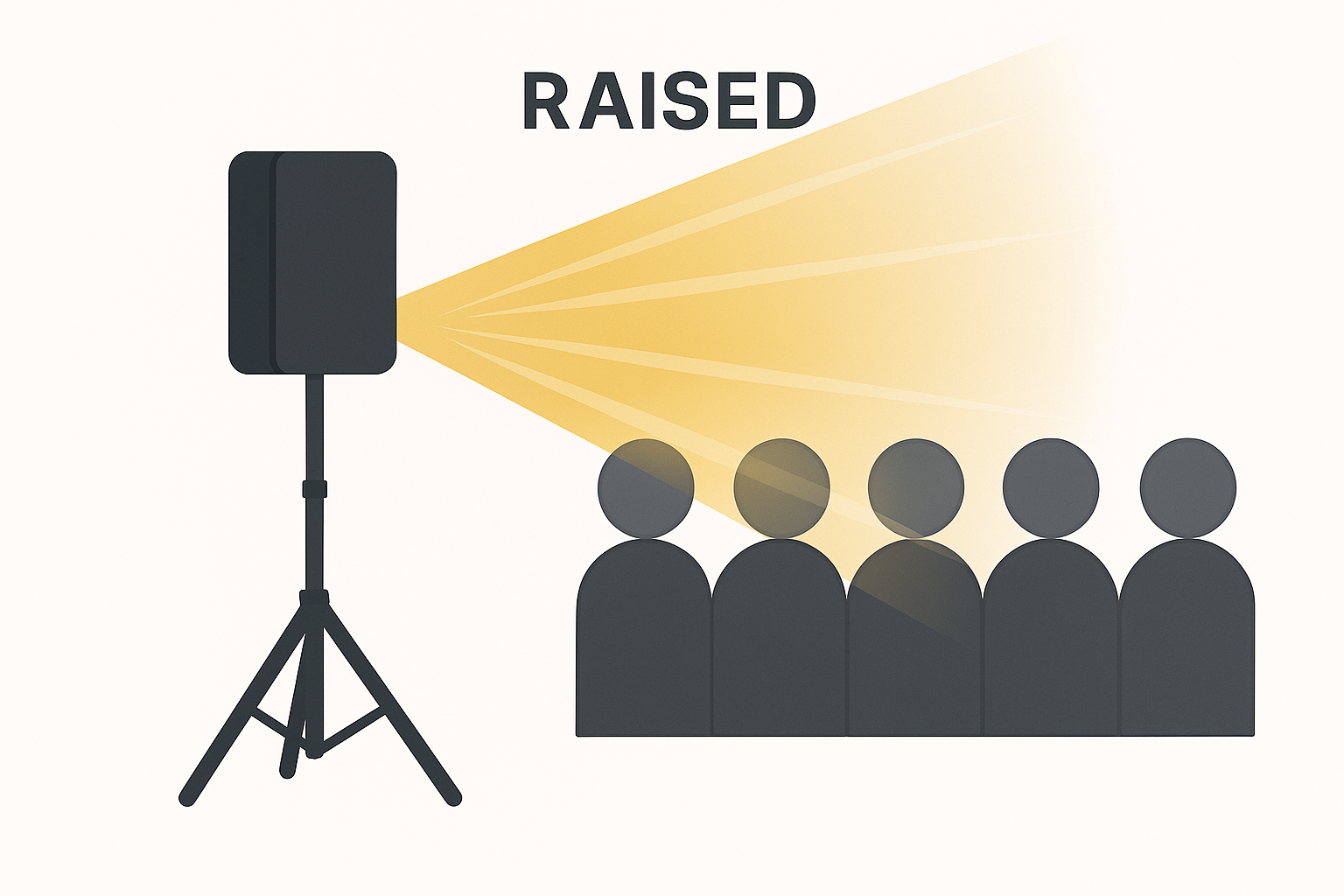
    Raised speaker on a stand projecting evenly over the audience

    A properly raised speaker—typically 6–7 feet high—projects over the audience, allowing sound to spread evenly. Tilting the speaker slightly downward helps maintain consistent volume from front to back without overpowering anyone.

    Raised speakers provide:

    • Cleaner sound
    • Better distance coverage
    • Less distortion
    • More even tone
    • Lower dB required to cover the same area

    Subwoofers Are the Exception

    Subwoofers are designed to sit on the floor. Low frequencies travel in all directions and pass through solid objects easily, so raising them offers little benefit.

    In fact, subs placed on the floor benefit from boundary coupling, which increases bass output and warmth.

    Simple rule:

    • Full-range speakers: Raise them.
    • Subwoofers: Keep them on the ground.

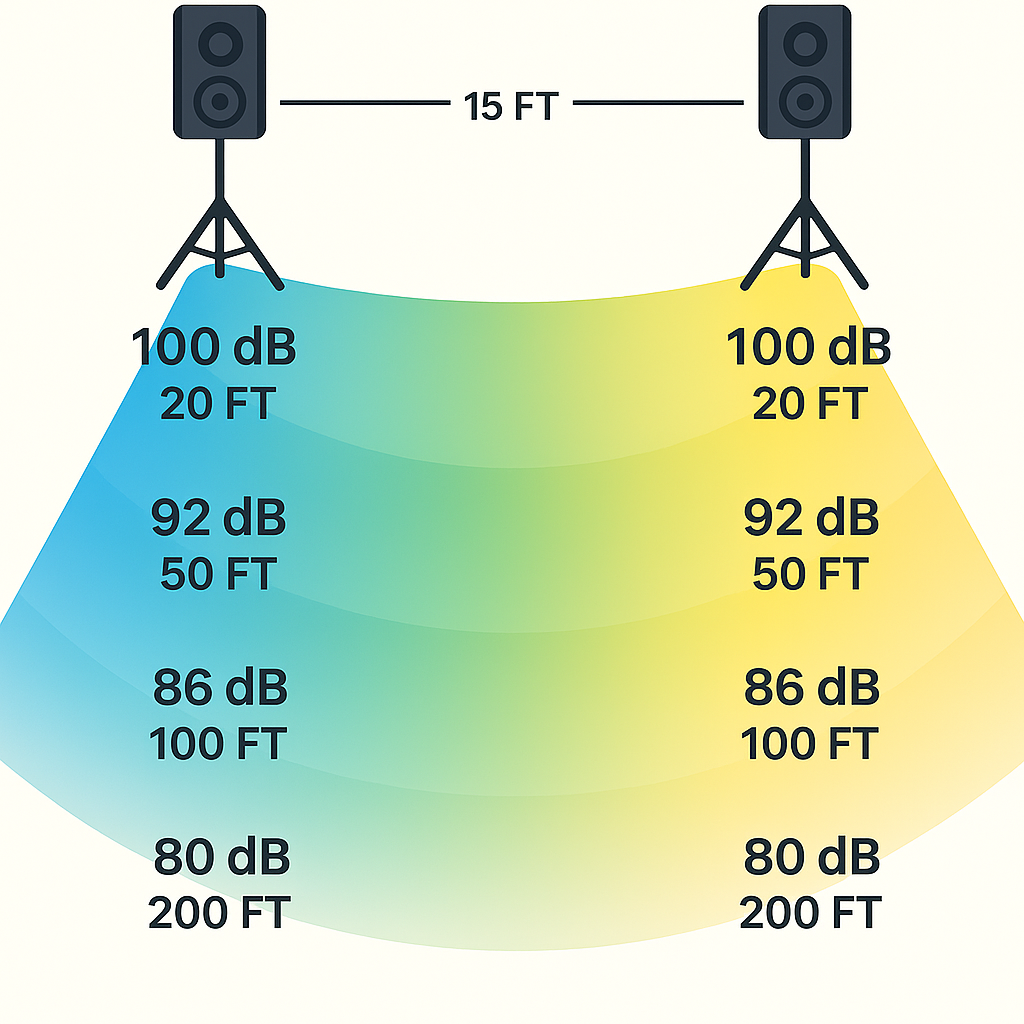
    Real-World Example: 15-Foot Stage With Audience 200 Feet Back

    Two speakers on a 15 foot stage projecting sound levels from 20 to 200 feet

    Let’s imagine a stage that is 15 feet wide, with the audience stretching 200 feet back.

    If your speakers produce about 100 dB at 20 feet, typical sound falloff looks like:

    • 20 ft → ~100 dB
    • 50 ft → ~92 dB
    • 100 ft → ~86 dB
    • 200 ft → ~80 dB

    80 dB at 200 feet is still perfectly usable for both speech and music as long as the speakers are raised correctly. If those same speakers were sitting too low, the sound would be absorbed by the first few rows, and the back of the audience would barely hear anything at all.

    But What About Weather?

    Temperature and moisture in the air can also affect how sound travels:

    • Cold air carries sound farther
    • Warm air absorbs sound more quickly
    • High humidity helps sound travel slightly better
    • Very dry air causes higher frequencies to fade sooner

    These factors can shift the levels slightly, but generally speaking, the distances and dB levels above are accurate for most real-world events.

    Why We Use QSC K12.2 for Larger Events

    For larger events—especially outdoor gatherings or long-throw setups—we typically use QSC K12.2 speakers because:

    • They offer a 70° horizontal coverage pattern
    • They stay clean and undistorted at higher volumes
    • They maintain clarity over long distances
    • They perform extremely well when elevated
    • They work reliably in open-air environments

    When properly raised, a pair of K12.2 speakers can deliver clean 80 dB at 200 ft, making them ideal for ceremonies, sports events, town gatherings, concerts, and outdoor stages.

    Common dB Levels in Daily Life

    Here’s a simple breakdown of everyday decibel levels to help put event audio into perspective:

    • 30 dB – Whisper, quiet library
    • 50 dB – Light conversation at home
    • 60–65 dB – Normal speaking voice
    • 70–75 dB – Background music, busier restaurants
    • 80 dB – Loud crowd noise, typical level 200 ft from raised PA speakers
    • 85–90 dB – Indoor event with amplified speech
    • 95–100 dB – Moderate live music
    • 110+ dB – Rock concert or nightclub

    Understanding these levels helps ensure your event is loud enough to be heard clearly, but still comfortable for your audience.

    Real-World Example: Two QSC K12.2 Covering 200 Feet

    If you place two QSC K12.2 speakers on a 15-foot-wide stage and raise them properly, they are capable of projecting approximately:

    • ~100 dB at 20 feet
    • ~92 dB at 50 feet
    • ~86 dB at 100 feet
    • ~80 dB at 200 feet

    This shows why height matters so much—when elevated, the speakers can project clean, usable sound all the way to the back without needing excessive volume.

    Links

    https://www.sweetwater.com/store/detail/K12.2–qsc-k12.2-2000w-12-inch-powered-speaker

  • Understanding Choir Microphones & Placement

    Understanding Choir Microphones & Placement

    Why Earthworks Gen 2 Mics Are the Gold Standard for Live Choir Reinforcement

    🏛 Introduction

    Reinforcing a choir live is one of the most challenging tasks in audio. Choirs spread wide across a stage, voices are often soft, room acoustics can be unpredictable, and the PA is usually much closer to the choir than ideal.

    At Humecky Audio & Video, we use Earthworks Gen 2 choir microphones because of their natural clarity, incredible gain-before-feedback, and the ability to capture a choir the way it truly sounds — powerful, unified, and expressive.

    But even the best microphone needs proper placement. This guide breaks down microphone height, distance, spacing, stage-type variations, EQ, and effects, along with visual diagrams for multiple real-world setups.

    🎶 Why Mic a Choir at All?

    1. Makes the Choir Sound Bigger

    Microphones allow you to lift the overall choir volume so the audience hears a full, rich ensemble, not just the front row or the loudest singers.

    2. Enhances Blend and Perceived Tuning With Effects

    Properly used effects can improve overall cohesion:

    • Chorus FX (used very lightly) adds width and can smooth minor pitch differences.
    • Reverb adds depth, warmth, and a “concert hall” feel so the choir sounds more polished.
    • A subtle tap delay can soften sharp consonants and improve perceived timing.

    3. Allows Section Balancing

    With multiple mics, the audio engineer can:

    • Boost harmony groups when needed.
    • Bring out the men’s parts during key sections.
    • Add presence to sopranos when they carry the melody.
    • Support weaker sections without overpowering the rest of the choir.

    4. Improves Clarity in Any Room

    Microphones help overcome poor acoustics, large sanctuary spaces, mixed seating, and general crowd noise. A properly mic’d choir always sounds more controlled and professional.

    🎼 Why We Use Earthworks Gen 2 Choir Microphones

    • Natural, transparent tone – what the choir sings is what the audience hears.
    • High sensitivity, low noise – captures the ensemble without spotlighting individual “hot” voices.
    • Excellent gain-before-feedback – crucial in churches where speakers are close.
    • Wide coverage – each mic can realistically cover around 50 singers, so multi-mic setups are efficient and powerful.

    📍 Ideal Microphone Placement (With Diagrams)

    Below are several common stage layouts, with diagrams that show recommended heights, distances, and spacing for Earthworks Gen 2 choir mics.

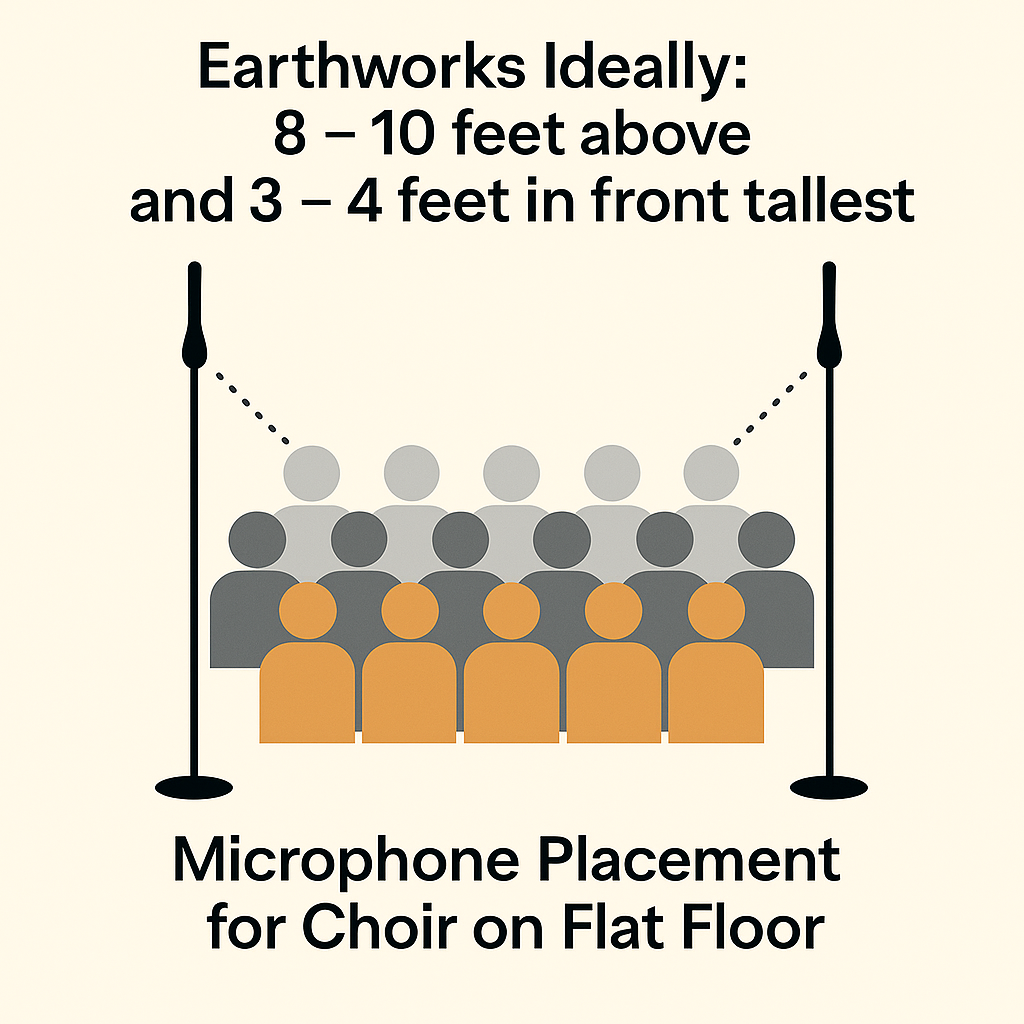
    1️⃣ Flat-Floor Choir (No Risers)

    Diagram showing microphone placement for choir on flat floor: Earthworks mics 8–10 feet above and 3–4 feet in front of the choir.
    Microphone Placement for Choir on Flat Floor

    When the choir stands on a flat floor, the mics must be higher and clearly in front to “see” the back rows.

    • Height: 8–10 ft above tallest singer
    • Distance in front: 3–4 ft
    • Spacing between mics: about 6–8 ft
    • Why: Prevents picking up individual singers and improves overall blend and clarity.

    This setup is common in gyms, fellowship halls, and multipurpose spaces where risers aren’t available.

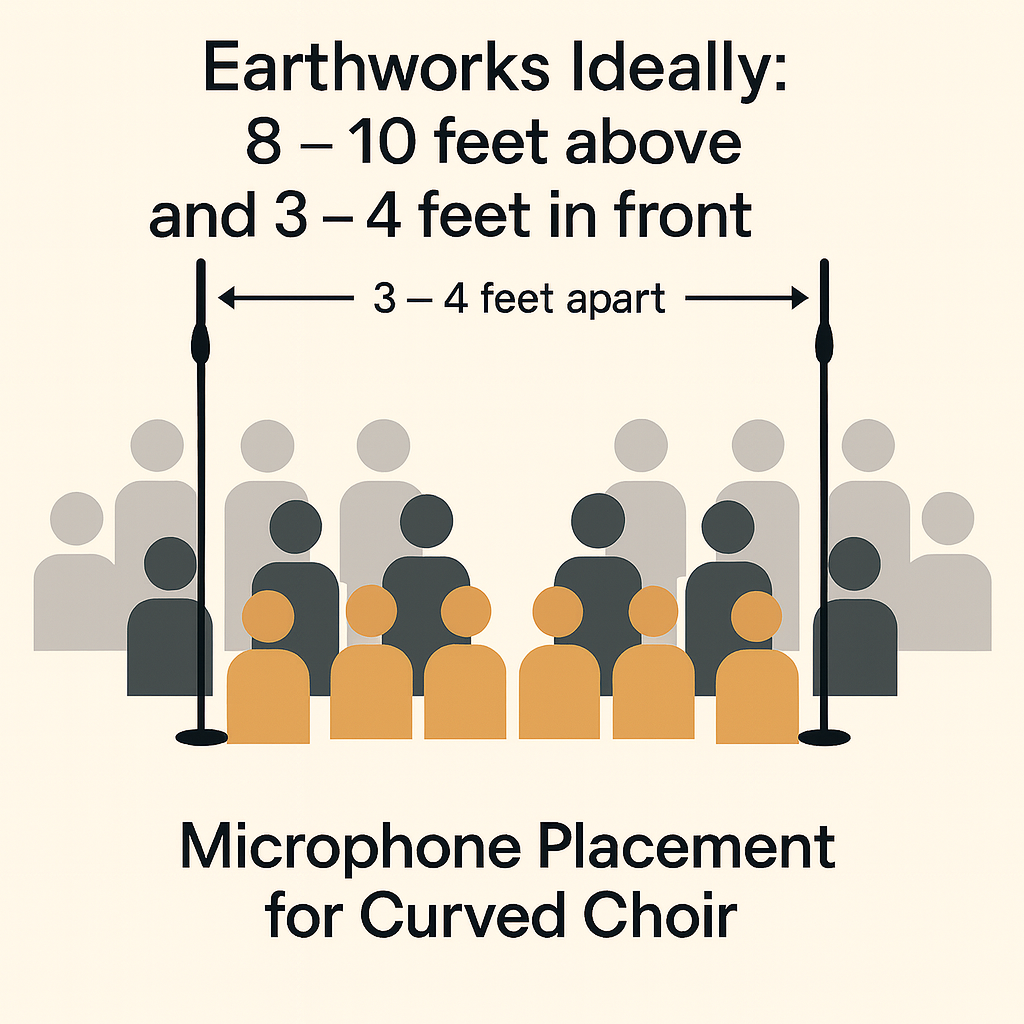
    2️⃣ Curved Choir on Risers (Standard Setup)

    Diagram showing microphone placement for curved choir on risers with Earthworks mics in front on tall stands.
    Microphone Placement for Curved Choir on Risers

    This is the most typical layout for church choirs: three or more rows on risers in a gentle arc.

    • Height: 8–10 ft above the tallest singer
    • Distance in front: 3–4 ft
    • Spacing: around 3–4 ft between microphones for a moderate-width arc
    • Why: Risers let the microphone “see” each row, giving even pickup from front to back.

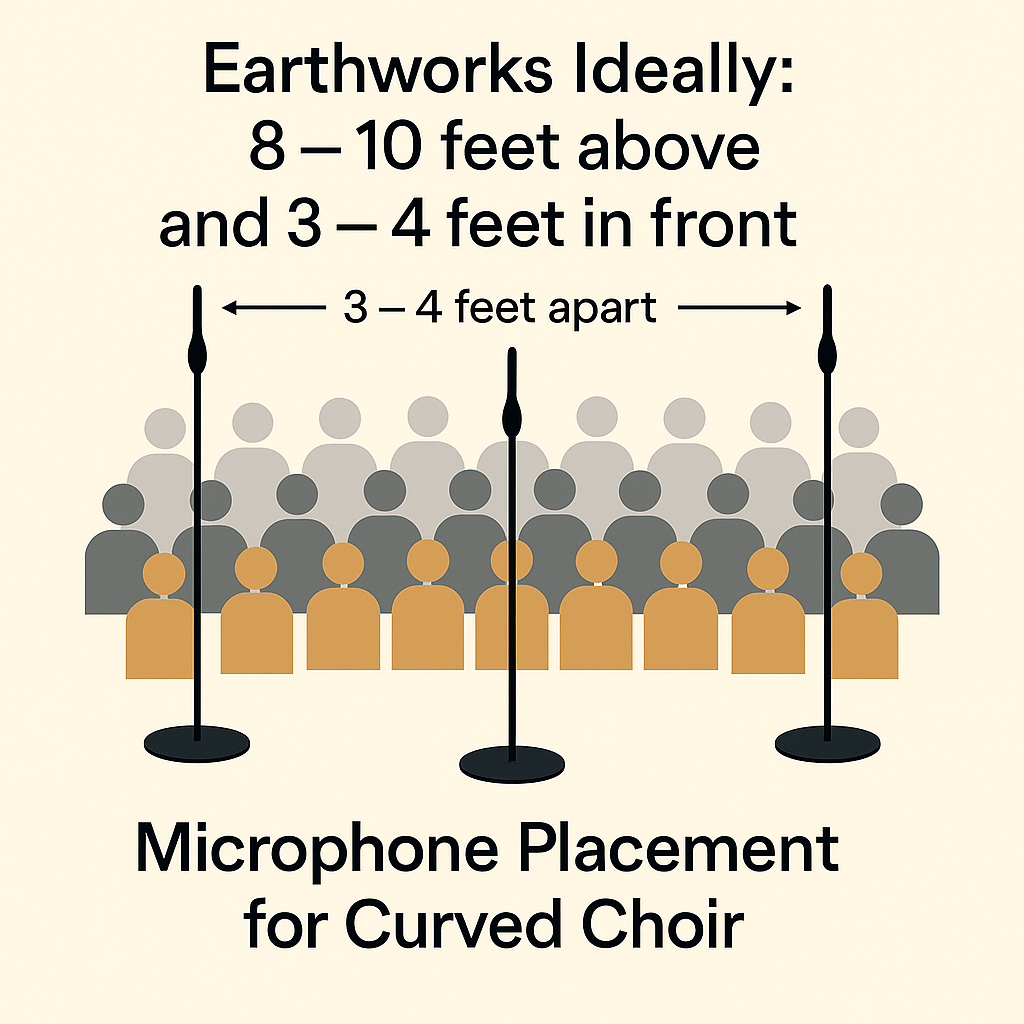
    3️⃣ Large Curved Choir (3-Mic Setup)

    Diagram showing three Earthworks microphones in front of a large curved choir, 8–10 feet high, 3–4 feet in front, about 5–6 feet apart.

    Microphone Placement for Large Curved Choir

    For wide-area choirs of around 80–150 singers, a three-mic configuration offers both coverage and control.

    • Height: 8–10 ft above tallest singer
    • Distance in front: 3–4 ft
    • Spacing: about 5–6 ft between mics along the curve
    • Why: Covers a wide arc while allowing the engineer to balance left, center, and right sections.

    With multiple mics, the audio engineer can subtly ride different sections, boosting harmonies, men’s parts, or melody lines without changing the whole mix.

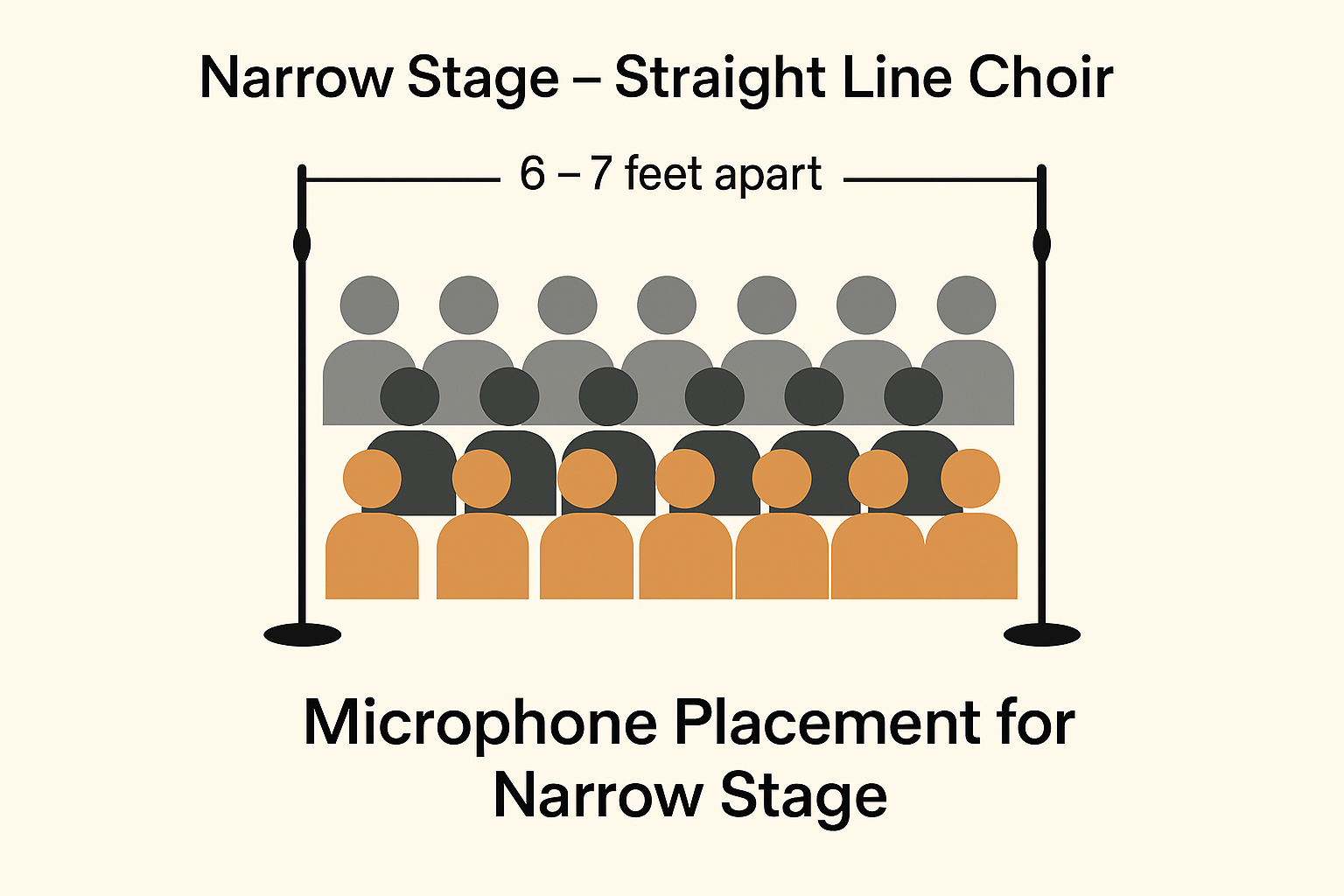
    4️⃣ Narrow Stage — Straight Line Choir

    Diagram labeled 'Narrow Stage – Straight Line Choir' showing two microphones 6–7 feet apart in front of a shallow choir.
    Microphone Placement for Narrow Stage

    When the stage is narrow and the choir must stand almost in a straight line, the spacing strategy changes slightly.

    • Height: 8–10 ft
    • Distance in front: 3–4 ft
    • Spacing: 6–7 ft apart to cover the line of singers
    • Why: Wider spacing helps cover the line without creating hot spots at the ends.

    🎤 How Many Mics Should You Use?

    • 1–2 mics: Small choirs or very narrow stages.
    • 2–3 mics: Medium to large curved choirs.
    • 3–4 mics: Extra-wide stages or very large choirs where sections are spread out.

    Using at least two microphones dramatically improves stereo image, blend, and section control, while still keeping the setup simple and clean.

    🎚 EQ Settings for a More Pleasant Choir Sound

    These are starting points; always adjust to the room and choir.

    • High-Pass Filter (HPF): 120–150 Hz normally, up to 180–200 Hz in very boomy rooms.
    • Low-Mid Cleanup: Gentle cut of 2–4 dB around 200–300 Hz to reduce muddiness.
    • Presence Boost: Light boost around 3–4 kHz for articulation and lyric clarity.
    • Air Band: Subtle lift around 10–12 kHz to add openness and sparkle.

    Smart EQ choices are a huge part of making the choir sound pleasant, open, and professional.

    🎛 Using Effects to Enhance Choir Blend

    Reverb

    Reverb is the most important effect for choir:

    • Hall reverb – lush, warm, and wide.
    • Plate reverb – brighter and more defined, great for modern worship.
    • Room reverb – subtle and natural, good for already-live spaces.

    Suggested settings:

    • Pre-delay: 20–35 ms
    • Decay: 1.8–2.5 seconds
    • High-cut: 8–10 kHz to keep things warm
    • Wet mix: 15–25% depending on room size and style

    Chorus FX

    A very subtle chorus can:

    • Smooth slight pitch differences between singers.
    • Add stereo width and a gentle “sheen.”
    • Help the choir sound more unified without sounding artificial.

    Compression & Dynamics

    Use light compression just to control peaks, not to squash dynamics:

    • Ratio: around 2:1
    • Attack: 20–30 ms
    • Release: 150–250 ms

    If you use an expander, keep it very gentle. Hard gates tend to sound choppy and unnatural on choirs.

    🎬 Final Thoughts

    Miking a choir is not just about making it louder — it’s about making it sound bigger, fuller, and more musical. With the right microphones, correct placement for your stage type, thoughtful EQ, and tasteful use of reverb and chorus FX, any choir can sound more blended, more in tune, and more inspiring.

    Whether your choir is on risers, a narrow stage, a wide curved arc, or standing on a flat floor, these guidelines and diagrams will help you get the most out of Earthworks Gen 2 choir microphones in live worship environments.

    ____________________________________________

    Links to Products

    Earthworks P30-S Periscope Gen 2 Condenser Mic | Sweetwater